StoryWeaver is an open source digital platform from Pratham Books on which stories can be read, downloaded, translated, versioned or printed. All the content on StoryWeaver is available under Creative Commons licenses to encourage collaboration and reuse.
- Blog Home
-
Search
- Labels
- recruitment (24)
- HR (1)
- JD (3)
- illustrators (11)
- ORACLE (6)
- Storytelling session (4)
- Mantra4Change (2)
- outreach (16)
- NGO (3)
- schools (2)
- multilingual books (2)
- FreeBooks (1)
- OpenLicensing (2)
- IMLD17 (10)
- Community Stories (4)
- Alemmanisch (1)
- storyweaver (16)
- school (3)
- partnership (2)
- The Asia Foundation (2)
- Rosetta (1)
- WiderNet (1)
- digital resources for learning (1)
- collaborations (1)
- work in progress (1)
- STEM 2017 (3)
- interns (1)
- WonderWhyWeek (11)
- activities (6)
- non-fiction (7)
- Children's books (7)
- books (8)
- Diversity (2)
- translation (10)
- creativity (2)
- 8 year old baby (1)
- shashi’s views (1)
- pratham new titles (1)
- innocence (1)
- maturity (1)
- children’s perspective (1)
- balancing act (1)
- Read-aloud. (1)
- illustration (4)
- workshop (8)
- creating (1)
- ideas (1)
- brainstorming (1)
- discussions (1)
- Picture books (4)
- narrative (1)
- visual narrative (1)
- Goshticha Shaniwar (1)
- World Storytelling Day (1)
- Little Thinking Minds (1)
- In the classroom (2)
- educators (5)
- RRR 2019 (1)
- winners (3)
- MIT Solve 2018 (1)
- open source (5)
- code (1)
- #WonderWhyWeek #NationalScienceDay (1)
- YouTube (5)
- Book Trailers (1)
- Jadav (1)
- Tamil editor (1)
- Delhi (3)
- International Translation Day; translator; translation; langauge; spotlight (2)
- STEMbooks (4)
- Conferences (1)
- talks (1)
- speaking (1)
- Goa (1)
- tutorial (1)
- tags (1)
- aao kahaani bune (1)
- SCERT (1)
- contest (2)
- Pratham (2)
- workshops (11)
- writers (6)
- Grants (1)
- Creative Commons (5)
- Kannada (7)
- #InternationalLiteracyDay (1)
- Hiring (7)
- Content Manager (2)
- IMLD 2020 (7)
- Freedom to Read (11)
- Freedom to Read 2020 (7)
- digital libraries (3)
- IMLD; translation partner IMLD 2020 (3)
- community (15)
- translators (8)
- CSR (1)
- spotlight (8)
- RRR2017 (2)
- jerry pinto (1)
- Illustrator (3)
- Childrensbooks (2)
- art (5)
- open (1)
- OpenSource (1)
- drawing (2)
- PrathamBooks (2)
- KabiniAmin (1)
- artist (1)
- Marathi-Kolami (1)
- Kolami (1)
- IMLD18 (1)
- National Science Day 2018 (1)
- Wonder Why Week (1)
- how to translate (1)
- translation guide (1)
- teachers (6)
- STEM (8)
- Pratham Books (11)
- STEM 2018 (1)
- Science (4)
- math (4)
- technology (7)
- Curioisty (1)
- Multilingual (1)
- Early Readers (1)
- IMLD2022 (1)
- IMLD (3)
- Endless Oaxaca (1)
- indigenous languages (1)
- translation partner (7)
- madhu bala joshi (1)
- hindi translator (1)
- Odia (3)
- IMLD 2019 (9)
- Freedom to Read 2019 (7)
- underserved (1)
- hyperlocal libraries (5)
- partners (1)
- publishers (1)
- COVID19 (1)
- eLearning (1)
- Read At Home With StoryWeaver (1)
- #ReadAtHomeWithStoryWeaver (1)
- Spotlight; Translate; language; International Translation Day (4)
- Freedom to Read (1)
- Amharic (1)
- Ras Abebe Aregay Library (1)
- Ethiopia (1)
- strategy (1)
- insights (1)
- JDs (2)
- FreedomtoRead report (1)
- Reading Programmes (2)
- librarian (1)
- Jr Designer (1)
- digital team (3)
- Campaign (1)
- free (1)
- children (4)
- book (4)
- Spotting (2)
- MadScientist (1)
- internships (1)
- Republic Day (1)
- curated list (2)
- RetellRemixRejoice2017 (1)
- contests (2)
- digital public goods (1)
- free open source (1)
- open license (3)
- storybooks (1)
- wise (1)
- UNICEF (1)
- DIET (1)
- #FreedomtoRead 2019 (1)
- Unnati (1)
- translations (8)
- RetellRemixRejoice2018 (1)
- Communities Rising (1)
- Tamil Nadu (2)
- FreeKidsBooks (3)
- social media manager (3)
- Jobs (6)
- jobs in bangalore (2)
- #EnvironmentMonth (1)
- insects (1)
- Women's Day (1)
- girl power (1)
- language champion (3)
- Indic Languages (1)
- Fonts (1)
- Type (1)
- Instagram (1)
- 6FrameStoryChallenge (2)
- reading (5)
- stories from the field (1)
- Tibetan (2)
- sanskrit (1)
- Azad India Foundation (1)
- #FreedomToRead2020 (1)
- Surjapuri (3)
- Who is Ameena (2)
- software (2)
- Publishing (1)
- The Better India (1)
- mGuru (1)
- Digital learning apps (1)
- literacy (2)
- freebooksforkids (1)
- RRR2016 (1)
- children's winners (1)
- Lea Shaver (1)
- book hunger (1)
- ending book hunger (1)
- Marathi readalongs (2)
- readalong (2)
- audio-visual storybooks (1)
- training (3)
- WhoisAmeena (1)
- results (1)
- Pragat Shikshan Sanstha (1)
- Maharashtra (1)
- eBooks (1)
- readalongs (2)
- StoryWeaver Kannada (1)
- One Day One Story (3)
- PB Champs (1)
- Konkani (4)
- language (3)
- Language Preservation (2)
- #TranslateAStory (2)
- virtual translation sprint (1)
- translation sprint (3)
- AIF (1)
- World Children's Day (1)
- child rights (1)
- Reading Recommendations (1)
- adivasi (1)
- tribal (1)
- sherein (1)
- bansal (1)
- blog (2)
- stories (4)
- education (6)
- communities (1)
- rare (1)
- kora (2)
- santali (2)
- script (1)
- bengal (1)
- tribe (1)
- odisha (1)
- birbhum (1)
- library (2)
- mobile (1)
- village (1)
- inktober2017 (1)
- Father's Day Reads (1)
- curated reading list (1)
- free books for kids (2)
- careers (3)
- data and analytics manager (1)
- data analyst (2)
- Project Manager; Career; Chhatisgarh; (1)
- audio books (1)
- interview (2)
- Jaya Bhattacharji Rose (1)
- Maharani Aulia (1)
- Translater (1)
- Indonesian (1)
- MES (1)
- OERs (1)
- Tamarind Tree (1)
- wordless books (1)
- #6FrameStoryChallenge (1)
- resources (3)
- AnjoraNoronha (1)
- India (1)
- Open Books (1)
- literacy skills (1)
- Wildlife Week; StoryWeaver; Wildlife Themed Books; Animals; Fauna; Indian Wildlife; Book Curations; (1)
- translator; language; International Translation Day (1)
- Bangla (2)
- work (1)
- documentation (1)
- aindri (1)
- Sudeshna SHome Ghosh (1)
- Meenu Thomas (1)
- environmentday2018 (1)
- Book your feelings (1)
- feeling (1)
- emotion (1)
- mood (1)
- sad (1)
- scared (1)
- fear (1)
- compassion (1)
- love (4)
- Empathy (1)
- anger (1)
- Curiosity (2)
- sadness (1)
- playful (1)
- naughty (1)
- family (2)
- friends (1)
- animals (1)
- excitement (1)
- Joy (1)
- happy (1)
- funny (3)
- fun (2)
- vanity (1)
- revenge (1)
- Pratham Education Foundation (3)
- free kids books (1)
- Different kinds of good (1)
- dimple (1)
- genetics (1)
- hereditary (1)
- song (1)
- folk (1)
- Rajasthan (2)
- fantasy (1)
- fiction (1)
- santa (1)
- Christmas (1)
- gift (1)
- leh (1)
- ladakh (1)
- tales (1)
- handicap (1)
- detective (1)
- rangoli (1)
- Kolam (1)
- civilization (1)
- home (1)
- culture (2)
- lifestyle (1)
- ocean (1)
- marine (1)
- underwater (1)
- author (2)
- open-source (1)
- PBChamps (1)
- Corporate Volunteering (2)
- Director - Fundraising and Donor Relations (1)
- Top reads (1)
- 2017 (2)
- supporters (1)
- storytelling (3)
- Roopa Pai (1)
- Tamil (1)
- TeachforIndia (1)
- international translation day; translate; Gondi; tribal language; tribal community; (1)
- seasonal eating (1)
- environment (4)
- story weaver (1)
- humana people (1)
- multilingual books for kids (1)
- theatre (1)
- collaboration (2)
- Kenneth Anderson (1)
- Tales of forest (1)
- renowned author K.P. Poornachandra Tejaswi (1)
- crocodiles are best parents in the world. (1)
- Graphic Designer (1)
- IMLD2016 (1)
- Weave-A-Story (1)
- World Book Day (2)
- read alouds (1)
- reading for joy (1)
- reading day (1)
- reading for beginners (1)
- Sherein bansal (1)
- chetana divya vasudev (1)
- agastya (1)
- kuppam (1)
- learning (4)
- teacher (2)
- innovation (1)
- curious (2)
- new functions (1)
- embed (1)
- Google Translate tool (1)
- French (2)
- Spanish (1)
- outreach team (1)
- digital engagements (1)
- Mother's Day (1)
- hackathon (3)
- Cambodia (1)
- editors (3)
- interviews (1)
- StoryWeaver Turns 5 (1)
- Sustainable Development Goals (1)
- SDGs (1)
- Book Lists (1)
- Lists (1)
- Features (1)
- upgrades (2)
- Platform (1)
- Library of Congress (1)
- awards (4)
- inthefield (1)
- v-shesh (1)
- Basa jawa (1)
- err 2016 (1)
- adult category winners (1)
- Freedom to Read 2021 (1)
- bhasha (2)
- Room to Read (1)
- CC BY (1)
- FreedomtoRead 2019 (2)
- chinyanja (1)
- africa (1)
- STEM books (3)
- product manager (1)
- Ol Chikki (1)
- typography (1)
- Indian languages (1)
- Why Waste (1)
- Sustainability Series (1)
- Water Conservation (1)
- new feature (1)
- audio stories (1)
- World Environment Day (1)
- campaigns (1)
- #DonateAphoto (1)
- animator (1)
- babakiki (1)
- Digital Books (4)
- Unni's Wish (1)
- Fly in Space (1)
- humour (2)
- NCF (1)
- editorspeak (1)
- classroom (2)
- FAQ (1)
- re-levelling (1)
- tutorials (1)
- translator (4)
- #WonderWhyWeek (2)
- nonfiction (3)
- AI (1)
- science education (1)
- NationalScienceDay (1)
- Suchana (1)
- Santatli (1)
- 6FramesFriday (1)
- ODOS; One Day One Story (1)
- Asia Foundation (1)
- Google (1)
- Grant (1)
- Spotathon (1)
- illustration campaign (1)
- art director (1)
- Pratham Books StoryWeaver (1)
- Children's Day 2021 (1)
- languages (2)
- Pratham Open School (1)
- joy of reading (1)
- reading list (1)
- monsoons (1)
- Engineering (1)
- nature (4)
- marcom (1)
- BookShare (1)
- TheBetterIndia (1)
- Accessible Books (1)
- Free Books (1)
- joyful reading (1)
- read aloud (1)
- level1 books (1)
- authors (2)
- IMLD 2018 (1)
- milestones (2)
- hyderabad (1)
- story (1)
- organizations (1)
- students (1)
- class (2)
- read (1)
- hindi (2)
- translate; translation; translator; language; International Translation Day (1)
- Keya's Day at the Beach (1)
- crabs (1)
- Radha Rangarajan (1)
- wildlife (1)
- photography (1)
- Indic Language (1)
- online (1)
- field visit (1)
- TFI (1)
- CIES (1)
- GlobalBookFun (1)
- tree (1)
- trees (1)
- flowers (1)
- fruits (1)
- rooted in our stories (1)
- root (1)
- rain (1)
- A Walk Among Trees (1)
- walk (1)
- gardener (1)
- Up World Down World (1)
- let's go seed collecting (1)
- Jadav and the Tree-Place (1)
- deepa's resolution (1)
- Asha gives up a bad habit (1)
- mango tango (1)
- seed (1)
- plant (1)
- Communications Manager (1)
- conservation (1)
- Marathi (2)
- article (1)
- themes (1)
- variety (1)
- futuristic (1)
- future (1)
- year (1)
- new year (1)
- resolution (1)
- health (1)
- germs (1)
- mental (1)
- preservation (1)
- climate (1)
- initiative (1)
- action (1)
- discussion (1)
- robots (1)
- comic (1)
- laugh (1)
- smile (1)
- amusing (1)
- learn (1)
- student (1)
- spark (1)
- aware (1)
- ignite (1)
- motivate (1)
- inspire (1)
- pond (1)
- lake (1)
- neighbourhood (1)
- protest (1)
- activism (1)
- voice (1)
- beauty (1)
- justice (1)
- sports (1)
- hockey (1)
- game (1)
- legend (1)
- dhyan chand (1)
- role model (1)
- tribute (1)
- prestige (1)
- humility (1)
- fabric (1)
- tradition (1)
- clothes (1)
- weave (1)
- sculpt (1)
- clay (1)
- pottery (1)
- embroidery (1)
- skill (1)
- industry (1)
- artisan (1)
- trust (1)
- care (1)
- Acceptance (1)
- tolerance (1)
- differences (1)
- gratitude (1)
- Career (1)
- foundational literacy (1)
- Emergent Readers (1)
- Translation Partner; Freedom to Read 2019; IMLD; International Mother Language Day; Marwari (1)
- sns foundation (1)
- Literacy Organisation (1)
- Jala (1)
- bahasa indonesia (1)
- Chinese (1)
- recommendations (1)
- animal (2)
- Pets (2)
- dogs (2)
- butterfly (2)
- donkeys (2)
- cat (2)
- lion (2)
- elephant (2)
- rooster (2)
- ant (2)
- giraffe (2)
- deer (2)
- caterpillar (2)
- rabbit (2)
- monkey (2)
- bird (2)
- crow (2)
- sparrow (2)
- crocodile (2)
- zoo (2)
- firefly (2)
- owl (2)
- bat (2)
- tips (1)
- Pratham India (1)
- Assam (1)
- digital reading (1)
- phonestories (1)
- creative process (1)
- trash (1)
- national science day (1)
- Marathi YouTube (1)
- video stories (1)
- Romanian (1)
- digital platforms (1)
- mathematics (2)
- hyderbad (1)
- StoryWeaver Partners (1)
- artists (1)
- Barkha Lohia (1)
- Gujarati (1)
- #InspirationSTEM (1)
- space (1)
- Gul in Space (1)
- aspirations (1)
- Google Serve campaign (1)
- translate; mobile translate; translation (1)
- digital (1)
- editorial (1)
- laughter month (1)
- laughter (1)
- World Book and Copyright Day 2020 (1)
- assistant editors (1)
- profile (1)
- update (1)
- 10 (1)
- 000 stories (1)
- AFCC (1)
- new creator (1)
- UI/UX (1)
- 200 languages (1)
- partnerships (1)
- Translation Partner; Freedom to Read 2019; IMLD; International Mother Language Day; Africa; (1)
- 2 million reads (1)
- Twitter Chat (1)
- kid lit (1)
- STorify (1)
- 20000 storybooks (1)
- Assamese (1)
- mBillion Awards (1)
- FAQs (1)
- vacancies (1)
- films (1)
- Anti-Bullying (1)
- Awareness (1)
- Student Power (1)
- project assistant (1)
- Dr. G.P. Rajarathnam (1)
- Kannada classics (1)
- poetry (1)
- Archives
- 2016-February (8)
- 2016-March (14)
- 2016-April (9)
- 2016-May (10)
- 2016-June (7)
- 2016-July (7)
- 2016-August (4)
- 2016-September (7)
- 2016-October (9)
- 2016-November (3)
- 2016-December (7)
- 2017-January (6)
- 2017-February (16)
- 2017-March (12)
- 2017-April (7)
- 2017-May (5)
- 2017-June (13)
- 2017-July (7)
- 2017-August (7)
- 2017-September (17)
- 2017-October (7)
- 2017-November (3)
- 2017-December (5)
- 2018-January (6)
- 2018-February (6)
- 2018-March (8)
- 2018-April (4)
- 2018-May (10)
- 2018-June (6)
- 2018-July (2)
- 2018-August (4)
- 2018-September (13)
- 2018-October (6)
- 2018-November (5)
- 2018-December (4)
- 2019-January (4)
- 2019-February (13)
- 2019-March (1)
- 2019-April (2)
- 2019-May (1)
- 2019-June (5)
- 2019-July (2)
- 2019-August (2)
- 2019-September (2)
- 2019-October (8)
- 2019-November (4)
- 2019-December (2)
- 2020-January (2)
- 2020-February (8)
- 2020-March (5)
- 2020-April (9)
- 2020-May (2)
- 2020-June (4)
- 2020-July (1)
- 2020-August (1)
- 2020-September (3)
- 2020-October (1)
- 2020-November (3)
- 2021-January (1)
- 2021-February (3)
- 2021-March (4)
- 2021-May (1)
- 2021-June (1)
- 2021-September (1)
- 2021-October (3)
- 2021-November (2)
- 2022-February (1)
- 2022-July (1)
- 2022-September (3)
- 2022-November (1)
- 2022-December (2)
- 2023-January (1)
- 2023-February (1)
- 2023-May (2)
How to make your StoryWeaver profile shine!
Posted by Sangeeta Velegar on April 19, 20181. Put a face to that name!
Click on your name on the top right of the menu. Select "Dashboard" from the drop-down. You should see "My Details" - everything you'd like your audience to know about you! First off, upload a picture of yourself!
2. Tell us a little bit about yourself, will you?
See that field marked "Profile Description"? Fill the box with a short description of yourself. Things you like. Stuff you loathe. You get the drift.
3. Where do you live on the web?
Have a website? A portfolio? A social media footprint that will help people know more about your creative accomplishments? Just fill in the address in the box labelled "Website."
Just one last thing - hit "Submit," and your brilliant, updated profile goes live. Enjoy!
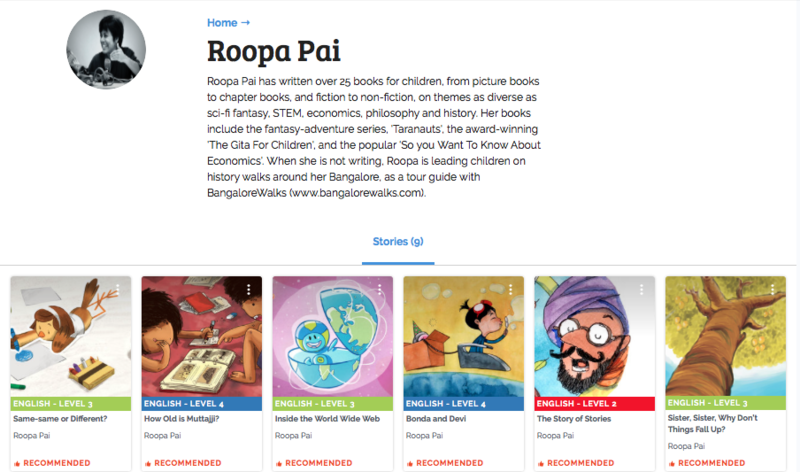
Take a look at author Roopa Pai's profile page below for some inspiration!
🟦🟦🟦🟦🟦🟦🟥🟥🟥🟥🟥🟦🟦 🟦🟦🟦🟦🟦🟦⬜⬜⬜⬜⬜🟦🟦 🟦🟦🟦🟦🟦🟥🟥🟥🟥🟥🟥🟥🟦 🟦🟦🟦🟦🟦⬜🟨🟨🟨🟨🟨⬜🟦 🟦🟦🟦🟦🟦⬜🟨⬛🟨⬛🟨⬜🟦 🟦🟦🟦🟦🟦🟦🟨🟨🟨🟨🟨🟦🟦 🟦🟦🟦🟦🟦🟦🟨⬛🟨⬛🟨🟦🟦 🟦🟦🟦🟦🟦🟦🟨🟨⬛🟨🟨🟦